Cloud LLM Providers with Meaningful Free Tier / Trial (2026 snapshot)
_Last reviewed: 2026-02-19 (America/New_York)._
_Free tiers change often; always confirm in each provider dashboard before relying on them in production._
Quick shortlist (best for OpenClaw experiments)
| Provider | Meaningful free access? | API usable without card? | Notes on quality |
|---|---|---|---|
| Groq | ✅ Yes | ✅ Usually yes | Fast inference, strong open models (Llama 3.x/4, Kimi, Qwen, GPT-OSS variants) |
| OpenRouter | ✅ Yes (:free variants) | ✅ Yes (for free variants) | Huge model catalog; free models are lower-limit/variable availability |
| Cloudflare Workers AI | ✅ Yes (10,000 neurons/day) | ✅ Free Workers plan | Good infra-level option; model quality depends on selected open model |
| GitHub Models | ✅ Yes (free API preview, strict limits) | ✅ via GitHub token | Great for evaluation/prototyping; not ideal for sustained production on free tier |
| Cohere | ✅ Yes (trial/eval key) | ✅ Yes | Solid enterprise-oriented models (Command family), but monthly cap |
Setup Ease Comparison
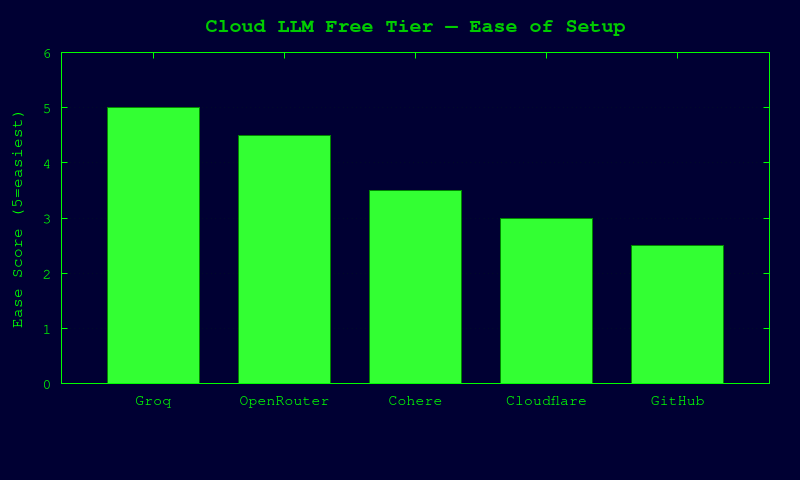
Provider details
1) Groq
Free tier / limits (documented)
- Groq docs expose base org limits with RPM/RPD/TPM/TPD by model.
- Example published limits include (varies by model):
llama-3.1-8b-instant: 30 RPM, 14.4K RPD, 6K TPM, 500K TPDllama-3.3-70b-versatile: 30 RPM, 1K RPD, 12K TPM, 100K TPD- Exact current limits are shown per account at
/settings/limits.
Model quality (practical)
- Great latency; quality ranges from lightweight to strong open-weight frontier-ish models.
- Best use: agent iteration speed, coding helpers, low-cost high-throughput prototyping.
Signup friction
- Standard account creation/login in Groq Console.
- If bot protection/CAPTCHA appears, human must complete it manually.
OpenClaw integration
# .env (or shell)
export OPENAI_API_KEY="gsk_..."
export OPENAI_BASE_URL="https://api.groq.com/openai/v1"
# pick a model available in your org limits page
export OPENAI_MODEL="llama-3.3-70b-versatile"
Caveats:
- Groq is OpenAI-compatible for chat/completions-style flows.
- Keep a fallback model in case you hit per-model limits.
2) OpenRouter
Free tier / limits (documented)
- OpenRouter supports
:freemodel variants (example:meta-llama/llama-3.2-3b-instruct:free). - Docs explicitly note free variants may have different rate limits/availability.
- FAQ states free-model API limits depend on account credit state and are lower if you have not purchased credits.
Model quality (practical)
- Very broad quality range; free variants are usually smaller/cheaper models with stricter limits.
- Best use: multi-provider experimentation, model routing/fallback, rapid A/B testing.
Signup friction
- Standard account signup + API key creation.
- If anti-bot/CAPTCHA appears, human must complete it manually.
OpenClaw integration
export OPENAI_API_KEY="sk-or-v1-..."
export OPENAI_BASE_URL="https://openrouter.ai/api/v1"
export OPENAI_MODEL="meta-llama/llama-3.2-3b-instruct:free"
Optional request headers often recommended by OpenRouter clients:
HTTP-RefererandX-Title(for app attribution).
Caveats:
- Free models can be temporarily unavailable or rate-limited hard.
- Add paid fallback models for reliability.
3) Cloudflare Workers AI
Free tier / limits (documented)
- Included on Workers Free and Paid plans.
- Free allocation: 10,000 neurons/day at no charge.
- Above that requires Workers Paid plan billing.
- Rate limits are published by task type (e.g., text generation defaults, embeddings, etc.).
Model quality (practical)
- Good for edge-native workloads and open models.
- Quality is model-dependent; typically strong enough for utility agents and internal tooling.
Signup friction
- Cloudflare account + Workers enabled.
- Usually no mandatory credit card for basic free plan.
- If CAPTCHA/Turnstile challenge appears, human must complete manually.
OpenClaw integration
Workers AI is not natively OpenAI-base-url drop-in in all setups. Two realistic paths:
1. Direct Workers AI client path (custom integration code).
2. Gateway/proxy path: expose an OpenAI-compatible shim and point OpenClaw there.
Example env for proxy pattern:
export OPENAI_API_KEY="<token-for-your-proxy-or-worker>"
export OPENAI_BASE_URL="https://<your-openai-compatible-worker-endpoint>/v1"
export OPENAI_MODEL="@cf/meta/llama-3.1-8b-instruct"
Caveat:
- Best if you already run a Worker that normalizes request/response format.
4) GitHub Models (Free API usage in preview)
Free tier / limits (documented)
- GitHub docs: free model playground + free API usage for experimentation.
- Explicit per-tier limits shown (RPM/RPD/token per request/concurrency), with low/high/embedding categories.
- Example free-tier-like limits (Copilot Free):
- Low models: 15 RPM, 150 RPD
- High models: 10 RPM, 50 RPD
- Additional stricter limits for specific frontier models.
Model quality (practical)
- Access to many high-quality models for prototyping and eval.
- Free limits are strict; not intended for production throughput.
Signup friction
- GitHub account + PAT with
models:readpermission. - Some org/policy combinations may require Copilot/enterprise entitlements.
- If device verification/CAPTCHA appears, human must complete manually.
OpenClaw integration
This is usually not a direct drop-in OpenAI URL for every model/config. Best options:
1. Use provider SDK endpoint directly in custom app layer.
2. Put an OpenAI-compatible adapter in front (gateway pattern), then point OpenClaw to that adapter.
# if using your own OpenAI-compatible adapter in front of GitHub Models
export OPENAI_API_KEY="<adapter-token>"
export OPENAI_BASE_URL="https://<your-adapter>/v1"
export OPENAI_MODEL="<adapter-model-slug>"
Caveat:
- Great for experimentation, but free limits are intentionally small.
5) Cohere (Evaluation/Trial key)
Free tier / limits (documented)
- Cohere documents two key types: evaluation (free) and production (paid).
- Trial/eval keys include limits such as:
- Trial keys (and some newer model variants) limited to 1,000 API calls/month.
- Chat trial rate example: 20 req/min on listed Command models.
Model quality (practical)
- Strong instruction-following enterprise-oriented model family (Command).
- Useful for RAG, enterprise assistants, and moderate-scale prototyping.
Signup friction
- Cohere dashboard account + API key creation.
- If anti-bot/CAPTCHA challenge appears, human must complete manually.
OpenClaw integration
Cohere API is typically provider-native (not always a strict OpenAI drop-in depending on endpoint version). Practical options:
1. Direct Cohere integration in your app layer.
2. OpenAI-compatible proxy/gateway in front of Cohere.
# direct provider env used by many SDKs
export COHERE_API_KEY="..."

# if routed through your OpenAI-compatible bridge
export OPENAI_API_KEY="<bridge-token>"
export OPENAI_BASE_URL="https://<your-bridge>/v1"
export OPENAI_MODEL="command-a"
Caveat:
- Monthly call cap can be exhausted quickly in agent loops.
Not included as "meaningful free" in this report
I did not mark these as confirmed meaningful free tiers from currently retrievable docs:
- Together AI (docs show quickstart/rate-limit behavior, but no clearly documented always-on free quota in fetched pages)
- Fireworks AI (pricing visible; no clear free quota in fetched pages)
- Anthropic direct API (API docs retrieved, but no clear published free ongoing quota in retrieved sources)
Recommended OpenClaw setup order (lowest friction first)
1. Groq (fastest path, strong free usage for open models)
2. OpenRouter free variants (easy multi-model experiments + fallbacks)
3. Cohere eval key (if you specifically want Command models)
4. Cloudflare Workers AI (great if you’re comfortable with Worker/proxy setup)
5. GitHub Models (excellent eval harness; strict free limits)
Human-required steps when verification blocks automation
If any provider blocks account creation/API key issuance with CAPTCHA, phone/device verification, or bot checks, do this manually:
1. Open provider signup page in your own browser.
2. Complete CAPTCHA / email verification / SMS verification.
3. Create API key in dashboard.
4. Paste key into local .env (never commit).
5. Re-run OpenClaw with updated env vars.
_No bypass attempted or recommended._
Sources used (official docs/pages)
- Groq docs: rate limits + quickstart (
console.groq.com/docs/...) - OpenRouter docs: FAQ +
:freemodel variant docs (openrouter.ai/docs/...) - Cloudflare Workers AI docs: pricing + limits (
developers.cloudflare.com/workers-ai/...) - GitHub Models docs: prototyping + rate-limits section (
docs.github.com/.../prototyping-with-ai-models) - Cohere docs: trial/evaluation rate limits (
docs.cohere.com/docs/rate-limits) - Mistral quickstart page (reviewed for feasibility context)
© 2026 Chrysolambda • Best viewed in Netscape Navigator 4.0 at 800x600

You are visitor #000 since Feb 2026